Skip to content
Learn with RV – Tech Blog

#testautomation #qa #programming #linux #devops

  • Home
  • Who am I?
  • 1-on-1 Mentoring
  • Test Automation Incubator
  • 24 Testimonials
  • YouTube
  • LinkedIn
  • Contact
Learn with RV – Tech Blog

#testautomation #qa #programming #linux #devops

April 9, 2026April 9, 2026

Configuring testIdAttribute in Playwright

When writing end-to-end tests with Playwright, selectors play a very important role in making your tests stable and maintainable. One common approach is using test IDs – explicit attributes added to your DOM purely for testing purposes.

By default, Playwright uses the data-testid attribute with page.getByTestId(). But what if your project uses a different naming convention? That is where testIdAttribute comes in.

Why customize testIdAttribute?

In real projects, teams often adopt their own attribute naming standards. For example:
– data-test
– id-test-data
– test-id

Instead of rewriting selectors or avoiding getByTestId(), Playwright allows you to globally configure which attribute to use.

This keeps your tests:
– more readable
– easier to refactor
– consistent with your codebase conventions

How to configure it?

Playwright introduced the testIdAttribute option in v1.27, making customization straightforward.

Here is how you can set it up:
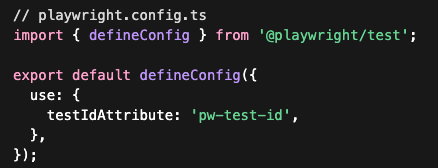
pw-data-test-id

Once configured, this line:

will now target:

data-test-id-html

Conclusion

The testIdAttribute option is a small but powerful feature in Playwright. It allows your testing strategy to align with your application’s structure without sacrificing clarity or maintainability.

If your team values consistency and clean test code, this is a configuration worth setting early on.

Enjoyed this article?
I share more practical automation tips on YouTube and LinkedIn.

Need structured guidance instead of learning alone?
I offer 1-on-1 mentoring – learn more → HERE

Or email me at iamqarv [at] gmail [dot] com

Post Views: 50

Related

Share this article:
Uncategorized

Post navigation

Previous post
Next post

Recent Posts

  • Upgrading Playwright package to latest version in simple steps
  • Oxfmt tutorial – the Prettier code formatter alternative, 30x faster
  • Configuring testIdAttribute in Playwright
  • Understanding p95 Percentiles in Load Testing (with k6 examples)
  • npm ci vs. npm install – what is the difference?

Recent Comments

  1. Paul on Web Accessibility: A step-by-step guide to Testing with pa11y
  2. Automated Tests for website Accessibility with Axe and TestCafe - Learn with RV - Tech Blog on How to generate E2E TestCafe Framework in seconds
  3. RV on Exploring Faker.js: A Powerful Tool for Generating Realistic Random Test Data
  4. Adrian Maciuc on Exploring Faker.js: A Powerful Tool for Generating Realistic Random Test Data
  5. Nick on Cypress vs Playwright vs Testcafe – which framework is faster?

Archives

  • April 2026
  • March 2026
  • February 2026
  • November 2025
  • October 2025
  • September 2025
  • August 2025
  • July 2025
  • June 2025
  • March 2025
  • February 2025
  • January 2025
  • November 2024
  • October 2024
  • September 2024
  • August 2024
  • July 2024
  • May 2024
  • April 2024
  • March 2024
  • February 2024
  • January 2024
  • December 2023
  • October 2023
  • September 2023
  • August 2023
  • July 2023
  • June 2023
  • May 2023
  • April 2023

Categories

  • Linux
  • Programming
  • QA
  • Tools
  • Uncategorized
©2026 Learn with RV – Tech Blog | WordPress Theme by SuperbThemes