Skip to content
Learn with RV – Tech Blog

#testautomation #qa #programming #linux #devops

  • Home
  • Who am I?
  • 1-on-1 Mentoring
  • Test Automation Incubator
  • 24 Testimonials
  • YouTube
  • LinkedIn
  • Contact
Learn with RV – Tech Blog

#testautomation #qa #programming #linux #devops

git-terminal-error
April 24, 2023April 25, 2023

GitHub – how to authenticate with a Personal Access Token

The error “Support for password authentication was removed on August 13, 2021” occurs because GitHub has removed support for password authentication. In July 2020, they announced their intent to require users to use token-based-authentication.

To solve the error, create a personal access token and use it instead of a password when authenticating with GitHub (over HTTPS, or to authenticate to the API over Basic Authentication).


Optional, but recommended steps

git-config

Step 1: Go to https://github.com/

Step 2: Go in the upper-right corner of your page > click profile photo > click Settings
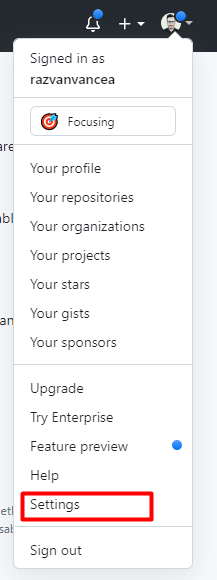
github-settings

Step 3: In the left sidebar, click <> Developer Settings
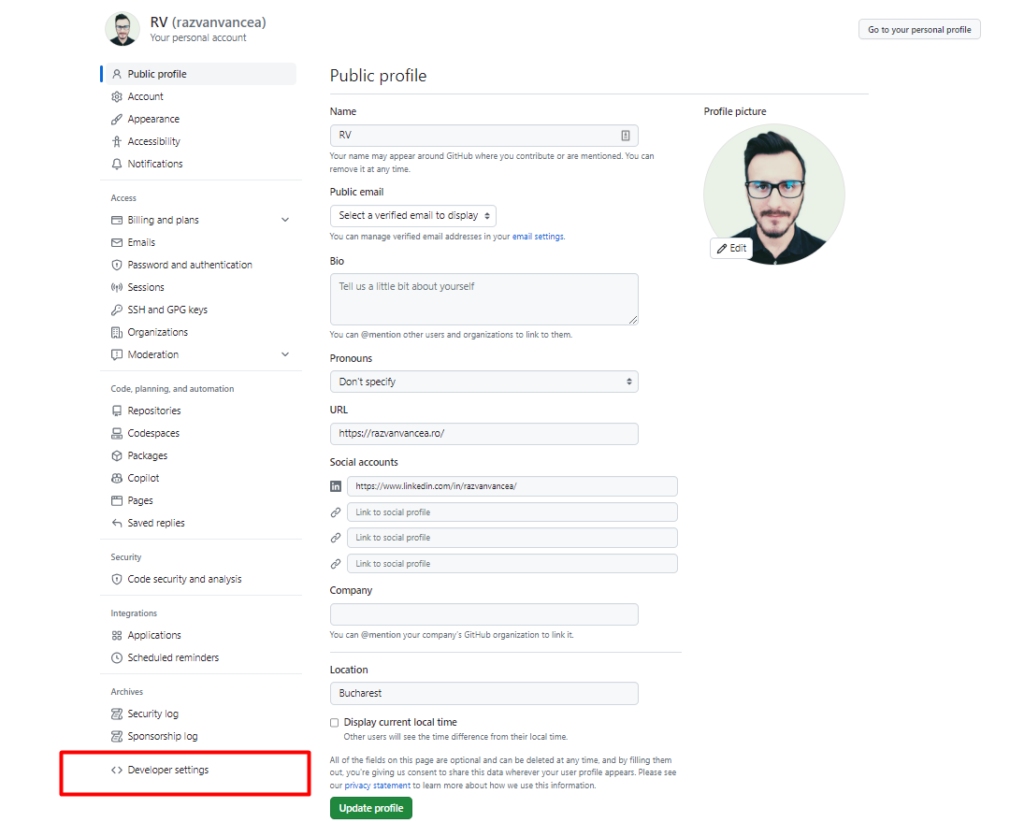
github-developer-settings

Step 4: In the left sidebar, under Personal access tokens, click Tokens (classic)
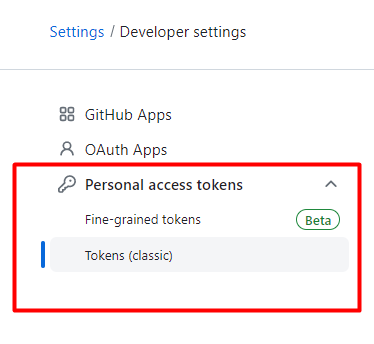
github-token-type

Step 5: Click Generate new token > Generate new token (classic)
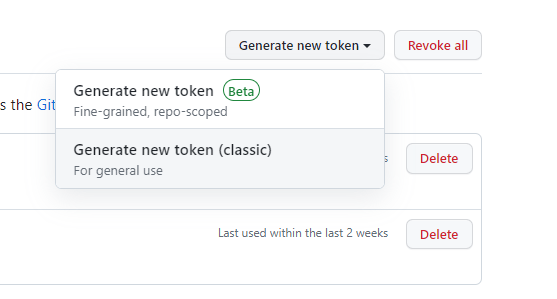
generate-token

Step 6: Add a Note name, set an Expiration period, and check the scopes you want to grant the corresponding access to the generated access token (e.g. to access repositories from CLI, select repo).

Note: a token with no assigned scopes can only access public information.

Step 7: Finally click Generate Token
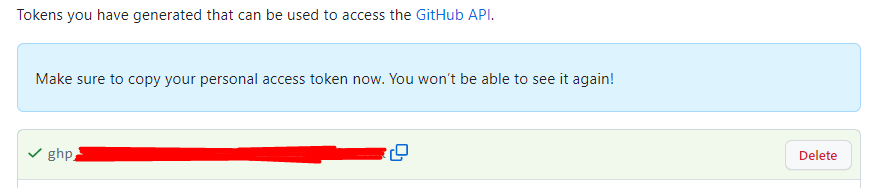
new-token-github

Make sure to copy the token as you will need it for further actions.

Once you have the token, you can enter it instead of your password when performing Git operations over HTTPS.

Feel free to cache the token with a Git client, to avoid manually entering it for every HTTPS git operation.

If you liked this article, then please subscribe to my YouTube Channel for Test Automation video tutorials. You can also find me on LinkedIn and Twitter.

Post Views: 228

Related

Share this article:
Tools

Post navigation

Previous post
Next post

Recent Posts

  • Using npm –prefix to Run Scripts from a Nested package.json
  • Unit Testing in JavaScript: Getting started with Vitest
  • Fail Fast in Playwright with maxFailures
  • Cleaner asserts in Grafana k6 load tests using expect
  • AI: What Happens When an AI’s Context Window Gets Full?

Recent Comments

  1. Paul on Web Accessibility: A step-by-step guide to Testing with pa11y
  2. Automated Tests for website Accessibility with Axe and TestCafe - Learn with RV - Tech Blog on How to generate E2E TestCafe Framework in seconds
  3. RV on Exploring Faker.js: A Powerful Tool for Generating Realistic Random Test Data
  4. Adrian Maciuc on Exploring Faker.js: A Powerful Tool for Generating Realistic Random Test Data
  5. Nick on Cypress vs Playwright vs Testcafe – which framework is faster?

Archives

  • July 2026
  • June 2026
  • May 2026
  • April 2026
  • March 2026
  • February 2026
  • November 2025
  • October 2025
  • September 2025
  • August 2025
  • July 2025
  • June 2025
  • March 2025
  • February 2025
  • January 2025
  • November 2024
  • October 2024
  • September 2024
  • August 2024
  • July 2024
  • May 2024
  • April 2024
  • March 2024
  • February 2024
  • January 2024
  • December 2023
  • October 2023
  • September 2023
  • August 2023
  • July 2023
  • June 2023
  • May 2023
  • April 2023

Categories

  • AI
  • k6
  • Linux
  • Programming
  • QA
  • Tools
  • Uncategorized
©2026 Learn with RV – Tech Blog | WordPress Theme by SuperbThemes