Skip to content
Learn with RV – Tech Blog

#testautomation #qa #programming #linux #devops

  • Home
  • Who am I?
  • 1-on-1 Mentoring
  • Test Automation Incubator
  • 24 Testimonials
  • YouTube
  • LinkedIn
  • Contact
Learn with RV – Tech Blog

#testautomation #qa #programming #linux #devops

s-vs-l
November 4, 2025November 27, 2025

‘selectors’ vs. ‘locators’ – what is the difference?

Everyone who works in test automation probably heard or used the terms ‘selector’ and ‘locator’. I was thinking, what is the difference between these two? They seem closely related, however they are not actually the same thing.

Locators

A locator is an abstraction that defines how your automation tool should find an element in the user interface.

We can think of it as an instruction or query that tells the automation engine “here is how to find the element I want to interact with”. Locators are part of the test framework’s API and usually wrap or reference a selector behind the scene.

Locator example (Selenium with Python)

locator-example

in the above example:
– By.ID is the locator strategy (a method for locating elements)
– “login-button” is the selector value
– Together, they form a locator that Selenium can use to find the element

In a nutshell:
A locator = (strategy + selector)

Selectors

A selector is a pattern or expression used to identify an element – commonly in the form of CSS selectors, XPath expressions, or accessibility attributes.

Selectors describe what element you’re looking for within the DOM

CSS Selector examples
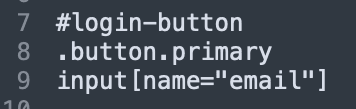
XPath example

Selectors come from web technologies, not from the automation framework itself. They’re a web standard and frameworks like Selenium, Playwright, etc use them under the hood to actually locate elements.

A locator wraps or uses a selector internally. When you write a locator, you’re telling the framework which selector type to use and how to apply it.

Conclusion
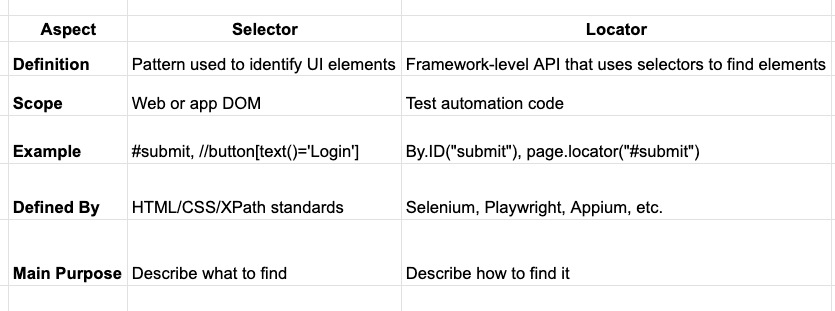
locators-summary

Enjoyed this article? Make sure to subscribe to my YouTube Channel for more Test Automation tutorials, and follow me on LinkedIn and Twitter for regular insights.
Looking to improve your test automation skills?
I’ve created a personalized 1-on-1 Mentoring program refined to boost YOUR CURRENT skills. Reach out at iamrv@razvanvancea.ro for more details and together will create a learning path adapted to your skills and goals that you are aiming for, in a timely-efficient manner🚀

Post Views: 476

Related

Share this article:
QA

Post navigation

Previous post
Next post

Recent Posts

  • Using npm –prefix to Run Scripts from a Nested package.json
  • Unit Testing in JavaScript: Getting started with Vitest
  • Fail Fast in Playwright with maxFailures
  • Cleaner asserts in Grafana k6 load tests using expect
  • AI: What Happens When an AI’s Context Window Gets Full?

Recent Comments

  1. Paul on Web Accessibility: A step-by-step guide to Testing with pa11y
  2. Automated Tests for website Accessibility with Axe and TestCafe - Learn with RV - Tech Blog on How to generate E2E TestCafe Framework in seconds
  3. RV on Exploring Faker.js: A Powerful Tool for Generating Realistic Random Test Data
  4. Adrian Maciuc on Exploring Faker.js: A Powerful Tool for Generating Realistic Random Test Data
  5. Nick on Cypress vs Playwright vs Testcafe – which framework is faster?

Archives

  • July 2026
  • June 2026
  • May 2026
  • April 2026
  • March 2026
  • February 2026
  • November 2025
  • October 2025
  • September 2025
  • August 2025
  • July 2025
  • June 2025
  • March 2025
  • February 2025
  • January 2025
  • November 2024
  • October 2024
  • September 2024
  • August 2024
  • July 2024
  • May 2024
  • April 2024
  • March 2024
  • February 2024
  • January 2024
  • December 2023
  • October 2023
  • September 2023
  • August 2023
  • July 2023
  • June 2023
  • May 2023
  • April 2023

Categories

  • AI
  • k6
  • Linux
  • Programming
  • QA
  • Tools
  • Uncategorized
©2026 Learn with RV – Tech Blog | WordPress Theme by SuperbThemes