Skip to content
Learn with RV – Tech Blog

#testautomation #qa #programming #linux #devops

  • Home
  • Who am I?
  • 1-on-1 Mentoring
  • Test Automation Incubator
  • 24 Testimonials
  • YouTube
  • LinkedIn
  • Contact
Learn with RV – Tech Blog

#testautomation #qa #programming #linux #devops

October 26, 2026October 26, 2026

How to Pass Additional Arguments to an npm Script

When working with npm scripts, you might occasionally need to pass additional command-line arguments without modifying your package.json.

Luckily, npm provides a simple way to do this using the -- separator.

The Problem

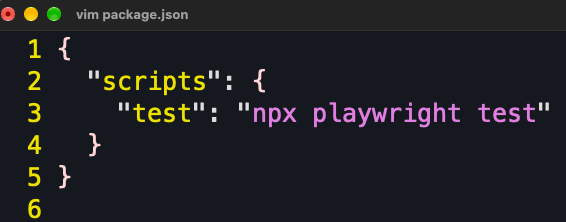
Let’s say you have the following script defined in your package.json:
npm-flag

Running npm run test executes:

npx playwright test

But what if you want to run your Playwright tests in headed mode, so you can actually see the browser while the tests execute?

You might try ‘npm run test --headed' , however, npm doesn’t reliably forward arguments like --headed directly to the underlying script.

The Solution: Use --

To pass additional arguments to an npm script, simply add -- before your arguments:

npm run test -- --headed

The -- separator tells npm to stop interpreting subsequent arguments and pass them directly to the script being executed.

Effectively, the command becomes:

npx playwright test --headed

That’s it! No changes to your package.json are necessary.

Final thoughts

The next time you need to customize the behavior of an npm script, remember this simple pattern:

npm run <script-name> -- <additional-arguments>

It’s a small trick, but it makes npm scripts much more flexible and saves you from creating multiple scripts for minor command variations.

One separator, unlimited possibilities.

Enjoyed this article?
I share more practical automation tips on YouTube and LinkedIn.

Need structured guidance instead of learning alone?
I offer 1-on-1 mentoring – learn more → HERE

Or email me at iamqarv [at] gmail [dot] com

Views: 2

Related

Share this article:
Uncategorized

Post navigation

Previous post

Leave a Reply

Your email address will not be published. Required fields are marked *

Recent Posts

  • How to Pass Additional Arguments to an npm Script
  • Integrating OpenCode with the Grafana k6 MCP Server
  • Customizing docker ps Output with –format
  • Using npm –prefix to Run Scripts from a Nested package.json
  • Unit Testing in JavaScript: Getting started with Vitest

Recent Comments

  1. Paul on Web Accessibility: A step-by-step guide to Testing with pa11y
  2. Automated Tests for website Accessibility with Axe and TestCafe - Learn with RV - Tech Blog on How to generate E2E TestCafe Framework in seconds
  3. RV on Exploring Faker.js: A Powerful Tool for Generating Realistic Random Test Data
  4. Adrian Maciuc on Exploring Faker.js: A Powerful Tool for Generating Realistic Random Test Data
  5. Nick on Cypress vs Playwright vs Testcafe – which framework is faster?

Archives

  • October 2026
  • September 2026
  • July 2026
  • June 2026
  • May 2026
  • April 2026
  • March 2026
  • February 2026
  • November 2025
  • October 2025
  • September 2025
  • August 2025
  • July 2025
  • June 2025
  • March 2025
  • February 2025
  • January 2025
  • November 2024
  • October 2024
  • September 2024
  • August 2024
  • July 2024
  • May 2024
  • April 2024
  • March 2024
  • February 2024
  • January 2024
  • December 2023
  • October 2023
  • September 2023
  • August 2023
  • July 2023
  • June 2023
  • May 2023
  • April 2023

Categories

  • AI
  • k6
  • Linux
  • Programming
  • QA
  • Tools
  • Uncategorized
©2026 Learn with RV – Tech Blog | WordPress Theme by SuperbThemes