Skip to content
Learn with RV – Tech Blog

#testautomation #qa #programming #linux #devops

  • Home
  • Who am I?
  • 1-on-1 Mentoring
  • Test Automation Incubator
  • 24 Testimonials
  • YouTube
  • LinkedIn
  • Contact
Learn with RV – Tech Blog

#testautomation #qa #programming #linux #devops

photo-img-node-vars
November 27, 2025November 27, 2025

NodeJS v20 added native support for reading environment variables

Starting with NodeJS v20, there is an experimental feature that allows us using environment variables natively in nodejs applications, without needing to install additional packages (e.g. dotenv).

What are environment variables?

Environment variables let you store configuration values outside your code. Things like API keys, ports, and database URLs. In Node.js, they’re all available through process.env

process-env-env-var

Setting environment variables

You can pass environment variables directly when you run your app in the terminal.

env-var-cli

In this example, Node receives USER_ID and USER_KEY, and you can read them using process.env inside your app

Using .env files

Starting from Node.js 20, there’s built-in experimental support for .env files – no external libraries needed.

To load this file, run Node with --env-file flag

env-file-node

And just like before, you can access the value with

You can even load multiple .env files

If you want Node to load a .env file only if it exists, without throwing an error, use
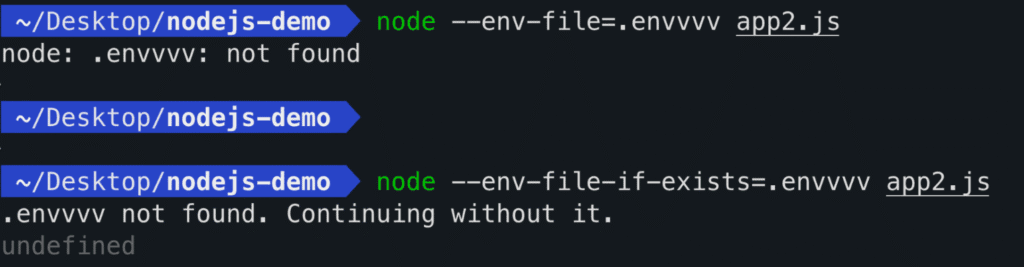
Loading .env Programatically

You can also load .env files directly from your code using process.loadEnvFile()  – no command-line flags needed.
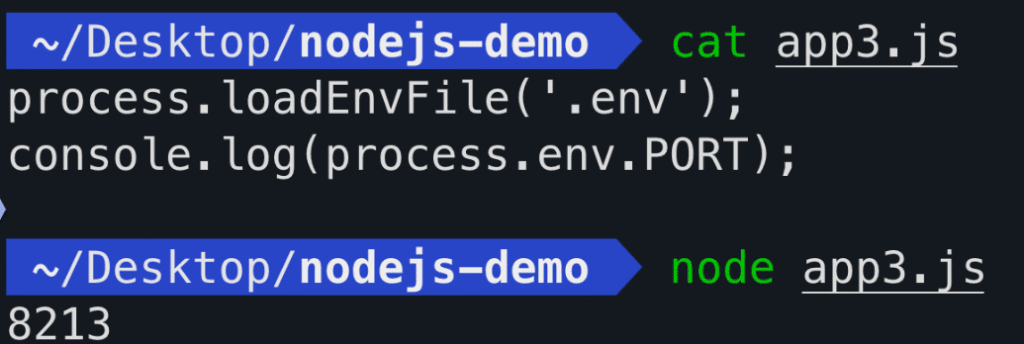
env-programatic
This works just like using the --env-file flag, but you trigger it inside your script.

Enjoyed this article? Make sure to subscribe to my YouTube Channel for more Test Automation tutorials, and follow me on LinkedIn and Twitter for regular insights.
Looking to improve your test automation skills?
I’ve created a personalized 1-on-1 Mentoring program refined to boost YOUR CURRENT skills. Reach out at iamrv@razvanvancea.ro for more details and together will create a learning path adapted to your skills and goals that you are aiming for, in a timely-efficient manner🚀

Post Views: 134

Related

Share this article:
Programming

Post navigation

Previous post
Next post

Recent Posts

  • Cleaner asserts in Grafana k6 load tests using expect
  • AI: What Happens When an AI’s Context Window Gets Full?
  • Upgrading Playwright package to latest version in simple steps
  • Oxfmt tutorial – the Prettier code formatter alternative, 30x faster
  • Configuring testIdAttribute in Playwright

Recent Comments

  1. Paul on Web Accessibility: A step-by-step guide to Testing with pa11y
  2. Automated Tests for website Accessibility with Axe and TestCafe - Learn with RV - Tech Blog on How to generate E2E TestCafe Framework in seconds
  3. RV on Exploring Faker.js: A Powerful Tool for Generating Realistic Random Test Data
  4. Adrian Maciuc on Exploring Faker.js: A Powerful Tool for Generating Realistic Random Test Data
  5. Nick on Cypress vs Playwright vs Testcafe – which framework is faster?

Archives

  • May 2026
  • April 2026
  • March 2026
  • February 2026
  • November 2025
  • October 2025
  • September 2025
  • August 2025
  • July 2025
  • June 2025
  • March 2025
  • February 2025
  • January 2025
  • November 2024
  • October 2024
  • September 2024
  • August 2024
  • July 2024
  • May 2024
  • April 2024
  • March 2024
  • February 2024
  • January 2024
  • December 2023
  • October 2023
  • September 2023
  • August 2023
  • July 2023
  • June 2023
  • May 2023
  • April 2023

Categories

  • AI
  • k6
  • Linux
  • Programming
  • QA
  • Tools
  • Uncategorized
©2026 Learn with RV – Tech Blog | WordPress Theme by SuperbThemes