This approach is about keeping tests stable when the application switches between multiple languages (e.g. romanian, french, english, etc).
Starting with the fact that nowadays applications support multiple languages (which is great for users!), for automation engineers it can quickly turn into a nightmare if the test selectors depend on visible text. This can be avoided by application an internationalization mechanism (i18n) into your automation design.
What is i18n?
The abbreviation i18n stands for internationalization – the number 18 represents the letters between ‘i’ and ‘n’.
In software, internationalization means preparing your application so it can easily be localized into different languages without changing the source code.
It means:
- extracting all user-visible texts into separate files (e.g. JSON files)
- using semantic keys instead of hardcoded text
- supporting dynamic language changes
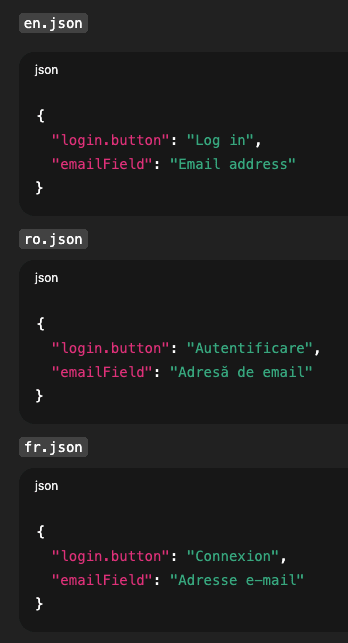
- keeping identical key structures across all languages
Folder structure example
A setup that I personally use is having a /locales folder with .json files like this
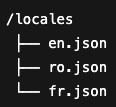
Each file contains the same keys but with translated values
The problem with text-based selectors
Let’s imagine your current test locates the login button like this
await $(‘//android.widget.TextView[@text=”Autentificare”]’).click();
It works fine in Romanian language – but as soon as the app switches to english/french, the visible text changes to “Login” or “Conexxion”.
Conclusion: Your test fails, even though the functionality works perfectly.
The solution
Instead of searching by visible plain text, design your selectors to use i18n keys - the ones defined in our /locales .json files.

For example:
await $(`//android.widget.TextView[@text="${i18n.login.button}"]`).click();
Benefits
Stable tests: changing the UI no longer breaks your tests
Lower maintenance: no need to update text-based locators with every translation update
Cross-locale compatibility: the same suite runs across all supported languages
Conclusion
By adopting i18n approach into your tests, you will create a robust, maintainable, and language-agnostic automation framework.